

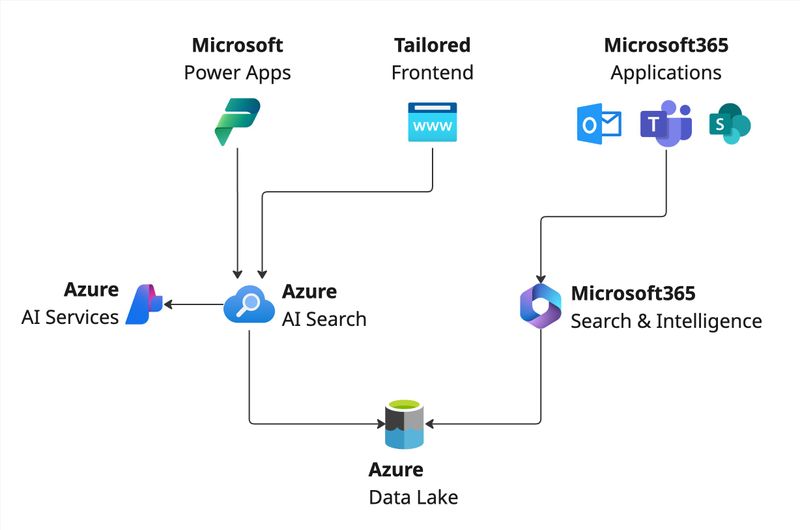
In today’s fast-paced work environment, employees need fast and easy access to documents—no matter where they are stored. Modern tools like Microsoft 365, Azure, and AI-driven search can consolidate and simplify the discovery of files, increasing productivity and collaboration. This post outlines how we help our customers manage documents more effectively using Azure services and Microsoft 365.
Core Use Cases: Easy Access, Search & Discovery
- Single Source of Truth
- Documents frequently live in various locations: shared drives, personal OneDrives, on-premises servers, or even scattered across different cloud storages.
- The aim is to provide a unified view, so users don’t waste time hunting for files.
- Smart Search & Discovery
- The folder-based approach often fails at scale; employees need intuitive, AI-driven search to quickly surface relevant documents.
- By incorporating solutions like Microsoft Search or Azure AI Search, finding content becomes faster and more accurate.
- Streamlined Collaboration
- Ensuring teams can co-author and share files in real time helps maintain version history and eliminates confusion.
- Seamless integration with Microsoft 365 tools (Teams, Outlook, etc.) keeps workflows efficient.
Possible Approaches
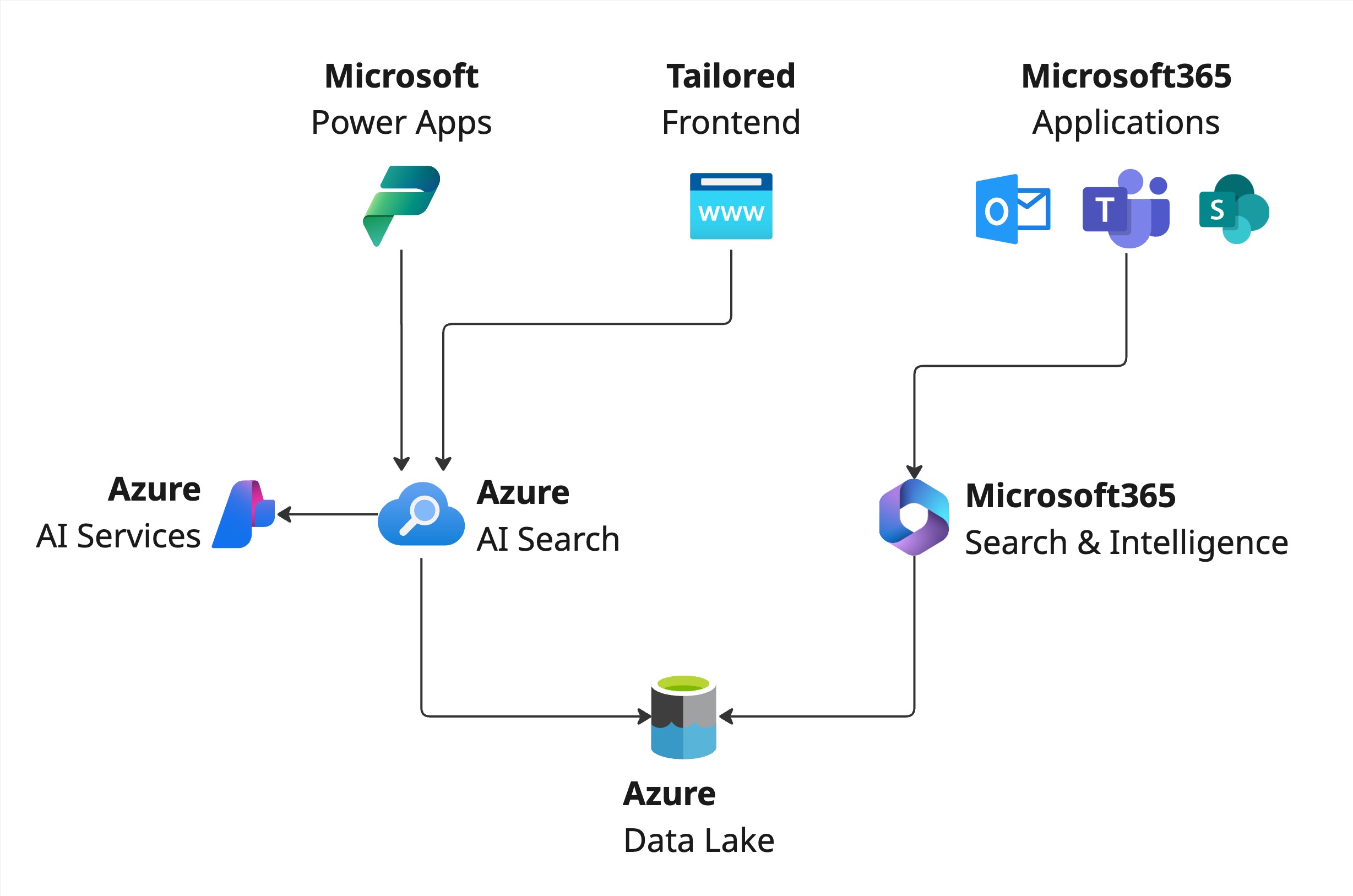
When it comes to linking existing or external document repositories into the Microsoft 365 ecosystem, we typically consider three main approaches. These options are ideal for modernizing your document workflows because they leverage powerful Microsoft and Azure services:
- Integrating Documents in Microsoft 365 directly with Azure Data Lake Storage
- Using Azure AI Search with a Custom Frontend
- Using Azure AI Search with Power Apps
We selected these options because each one offers a unique balance of ease-of-use, scalability, AI capabilities, and seamless integration with the broader Microsoft environment. Below is a brief look at how each approach works.
Option A: Microsoft 365 Integration
- How It Works: Store documents in Azure Storage (or another supported location) and use Microsoft Search connectors to index and surface content directly within Microsoft 365 (SharePoint, Office.com, Teams).
- Why Consider This:
- Familiar user interface within Microsoft 365.
- Centralized security, compliance, and user management via Azure AD.
- Minimal development effort beyond configuration.
Option B: Azure AI Search + Custom Frontend
- How It Works: Leverage Azure AI Search to index documents from various sources (Blob Storage, on-premises file shares, etc.). Build a custom application (web or mobile) that interfaces with the search index, offering advanced search features (OCR, language detection, etc.).
- Why Consider This:
- Highly customizable user experience.
- Advanced AI skills for enriched search and discovery.
- Flexibility to integrate with other Azure services (e.g., analytics, language services).
Option C: Azure AI Search + Power Apps
- How It Works: Similar to the second option, but instead of fully custom development, use Power Apps as the rapid application platform. Documents are indexed by Azure AI Search, and Power Apps provides the interface for searching and viewing.
- Why Consider This:
- Low-code approach for quick development and deployment.
- Easily integrates with Microsoft 365 (Teams, SharePoint) and the rest of the Power Platform (Power Automate, Power BI).
- Ideal for scenarios needing agile solutions without the overhead of a custom-built application.
How We Help You Choose the Right Strategy
Selecting the right path depends on your environment, existing tools, and specific requirements for security, compliance, and user experience. Here’s how we typically guide our customers:
- Needs Assessment
- We begin by evaluating your current document landscape: Where do you store files? What tools are in place? How do users typically search for content?
- Based on these findings, we identify challenges related to search relevance, collaboration, and data governance.
- Option Exploration
- We discuss the three main approaches (and sometimes other specialized variations) to determine the best fit.
- We consider budget, timeline, technical complexity, and any unique compliance demands in your industry.
- Proof of Concept (PoC)
- If needed, we develop a small-scale pilot to validate how quickly users can find documents and collaborate under each proposed solution.
- This helps refine requirements and ensures the final solution truly addresses your business challenges.
- Implementation & Rollout
- Once the approach is finalized, we help deploy and configure the solution, ensuring seamless integration into your Microsoft 365 environment.
- We also provide training and enablement so your team is fully prepared to maintain and extend the solution over time.
Ready to explore modern document management for your organization? We’re here to help you evaluate these and other options, tailoring a solution that meets your specific needs. Contact us today to schedule a conversation about making your documents effortlessly accessible with Microsoft 365, Azure, and AI-driven search.